Playtime Levels Installation
1. Extract & Find the Folder
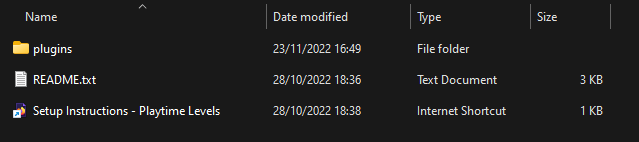
Extract the downloaded .zip file and locate the folder named "plugins"
2. Install Dependencies
You will need some plugins for this config to function properly. Download the following files and add them to your /plugins folder.
The plugins required are: DeluxeMenus, PlaceholderAPI, and ConsoleLogger
Required Plugin Downloads
Open the download list and download each required plugin. Upload the JARs directly to your server's /plugins folder; do not extract them. If a required plugin is already installed, check its compatibility before replacing it.
3. Installing the config
If you have installed DeluxeMenus for the first time, drag the contents of the /plugins folder into the /plugins folder of your server. This should hold the config files for DeluxeMenus. You can then restart your server and move on to Step 4.
If you already have DeluxeMenus running other GUIs on your server, you will need to copy the menus separately.
Open /plugins/DeluxeMenus/gui_menus in the Playtime Levels resource folder and copy the YML files. Upload these to the /plugins/DeluxeMenus/gui_menus folder in your server host.
Navigate to /plugins/DeluxeMenus/config.yml in your server host. Open the file and add the following to the bottom of the file:
config.yml content (Expand)
  playtime:
    file: playtime.yml
  playtime2:
    file: playtime2.yml
  playtime3:
    file: playtime3.yml
  playtime4:
    file: playtime4.yml
  playtime5:
    file: playtime5.yml
  playtime6:
    file: playtime6.yml
  playtime7:
    file: playtime7.yml
  playtime8:
    file: playtime8.yml
  playtime9:
    file: playtime9.yml
  playtime10:
    file: playtime10.yml
  playtime11:
    file: playtime11.yml
  playtime12:
    file: playtime12.yml
  playtime13:
    file: playtime13.yml
  playtime14:
    file: playtime14.yml
  playtime15:
    file: playtime15.yml
You can now reload DeluxeMenus with /dm reload and continue.
4. Final Setup
Playtime Rewards should now be working on your server. However, all players will need the playtimelevels.open permission to be able to use the menu. Make sure you grant this to the rank that you want to be able to use them.
The config is built to work with Essentials (Money / Economy), and PlayerPoints (Coins). If your server uses a different plugin, you'll have to change the commands in the file (but this can be done quickly with FIND and REPLACE).
5. Placeholder
To show the current Playtime Level of a player, use the placeholder: %deluxemenus_meta_playtimelevels.current.level_INTEGER_0%